
Categories
Magento
WordPress
SAP Commerce
Odoo
Shopify
Typo3
Shopware
nopCommerce
Pimcore
Hyvä
OXID eShop



















































































Product specification
Link Guest Orders to Customer Account is a Magento 2 extension developed by PIT Solutions that automatically assigns guest orders to an existing customer account using the same email address during customer registration from both the frontend and backend. This powerful Magento ecommerce extension helps streamline order management and improves customer experience by ensuring all orders are properly linked.
Features
Features of this Magento e-commerce extension:
-
Checks for guest orders during customer registration and automatically assigns them to the customer account if the same email address exists.
-
Links guest orders placed by already registered customers to their customer account.
-
Automatically sets default shipping and billing addresses for the customer.
-
Allows configuring a follow-up email for guest orders to encourage customers to register.
-
Option to enable/disable the extension.
-
Option to enable/disable follow-up emails within the extension.
-
Admin access control for secure management.
-
Maps all guest orders created with the customer’s email when a customer is created from the frontend or backend.
Installation
To install the Link Guest Orders to Customer Account Extension for Magento 2, follow the steps below.
1) Download the extension.
2) Access your web server directories and unzip and upload the content of the zip file to app/code/Pits/LinkOrders directory.
3) Run the following commands from the SSH terminal of the server to complete the installation.
- Enable the module - php bin/magento module:enable Pits_LinkOrders
- Update the database schema - php bin/magento setup:upgrade
- Generate and pre-compile classes - php bin/magento setup:di:compile
- Deploy static files - php bin/magento setup:static-content:deploy
- Clear the cache – php bin/magento cache:flush
Link Previous Guest Orders to Registered Customers
After installing and enabling the extension in store configuration, run the following CLI command from project root folder to associate previously placed guest orders with registered customer accounts.
php bin/magento pits:link-guest-orders
This command will automatically:
- Identify guest orders where the email matches an existing customer.
- Assign the order to the corresponding customer account.
- Convert the order from guest to customer.
Recommended for Large Customer Databases
If your store contains more than 5000 customers, it is strongly recommended to execute the command in batches to avoid high memory usage and improve performance.
Use the start and end parameters to process customers within a specific Customer ID range.
Example:
php bin/magento pits:link-guest-orders --start=1 --end=5000
This command processes customers with Customer ID from 1 to 5000.
For the next batch, increment the range:
php bin/magento pits:link-guest-orders --start=5001 --end=10000
A batch size of 5000 customers is considered a safe and stable value for most environments.
Running Without Parameters
If the command is executed without the start and end options:
php bin/magento pits:link-guest-orders
All customers will be processed without any limit.
This is suitable for small to medium-sized stores but not recommended for large databases.
Before executing the command, please ensure the following:
- Perform a complete backup of the database.
- Test and validate the command in a staging environment prior to production execution.
- Schedule the execution during off-peak hours to reduce potential server load.
Screenshots / Video
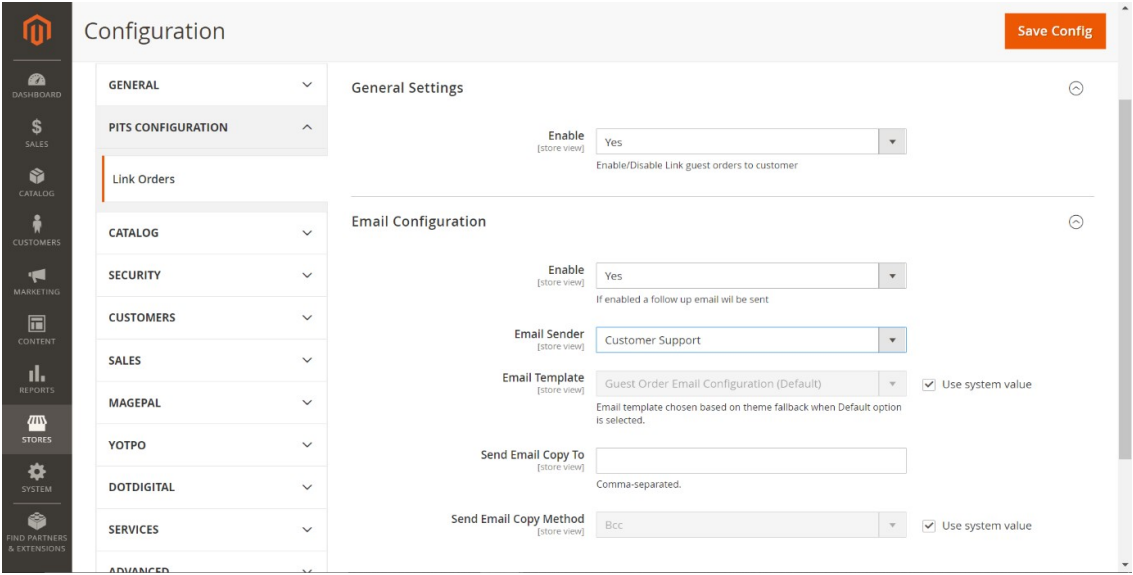
From the admin backend, go to Stores > Configuration>PITS Configuration >LinkOrders
Select Yes in the Enable dropdown option to enable the extension.
We can enable follow-up email for guest orders which asks customers to register. Select Yes to enable send follow-up email in the Enable dropdown option.
Select email sender from which follow-up emails needs to be sent from the Email Sender option.
Select email template for follow-up emails to be sent from the Email Template option.
Enter email address to which you want to send the copy of follow-up email from the Send Email Copy To option. In case there is more than one email, use comma to separate them.
Select copy email method from Send Email Copy Method. i.e. Bcc or separate email.
Click Save Config and clear the cache. That’s it
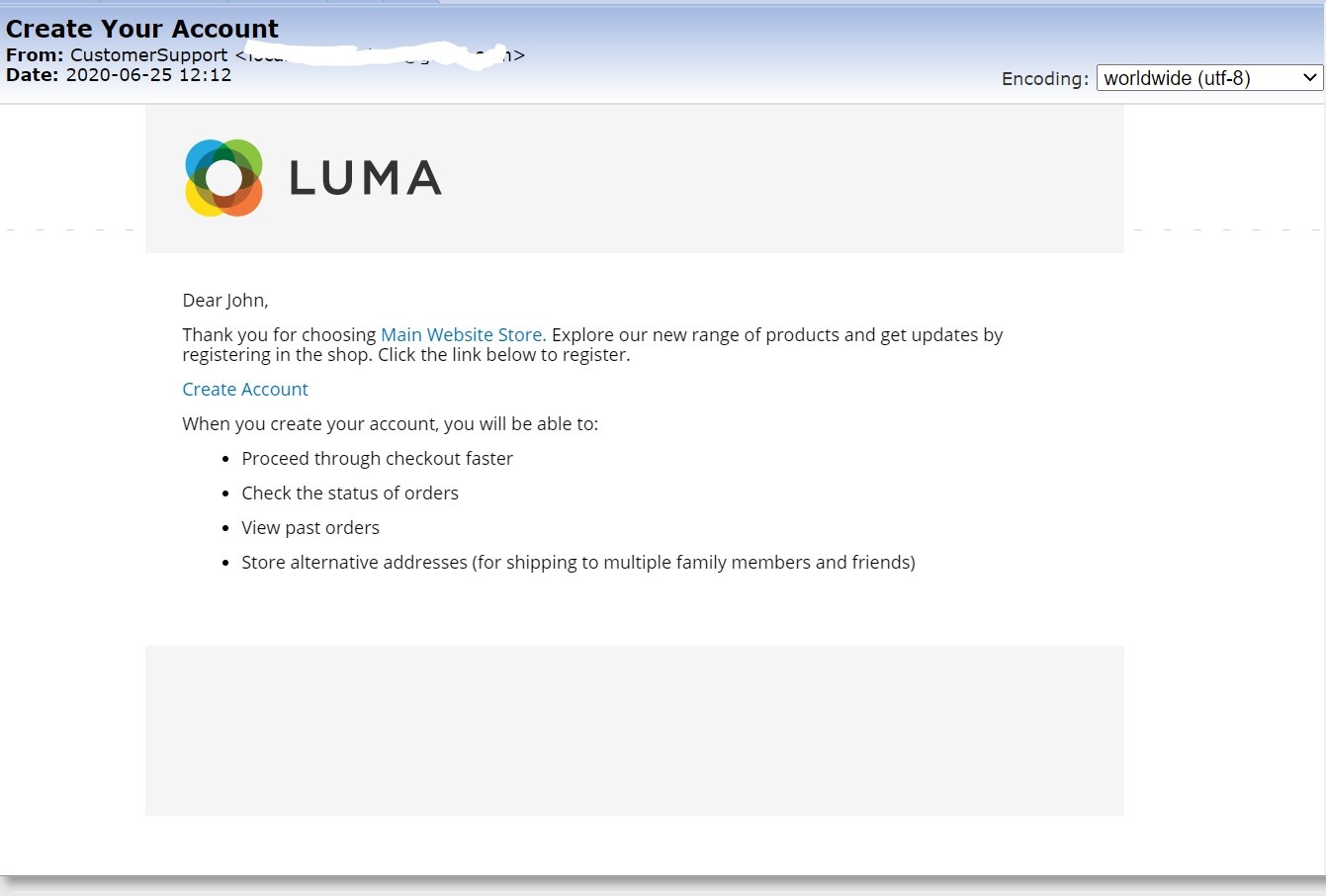
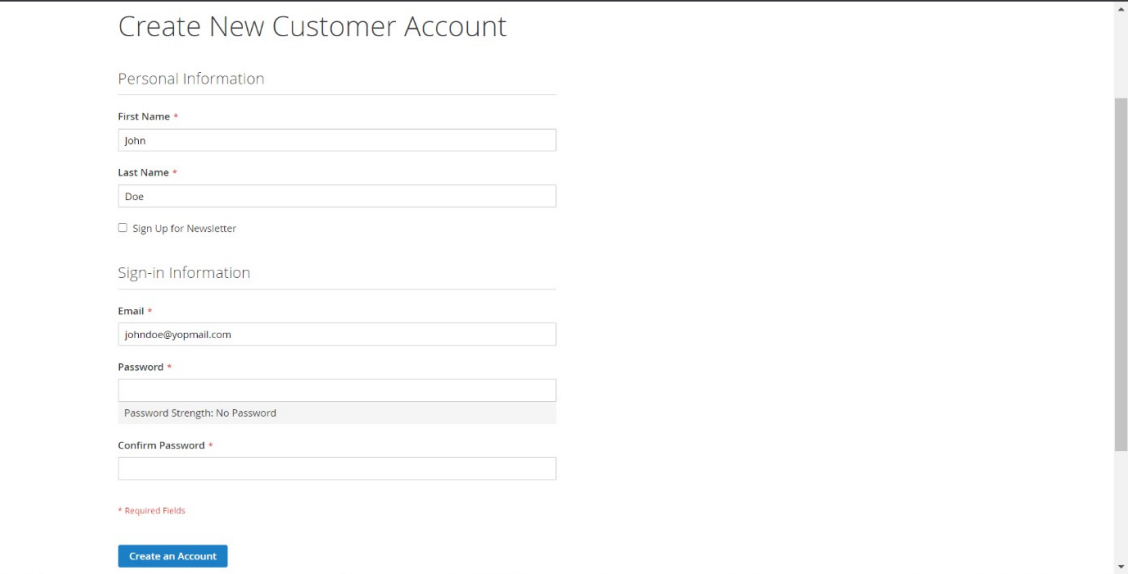
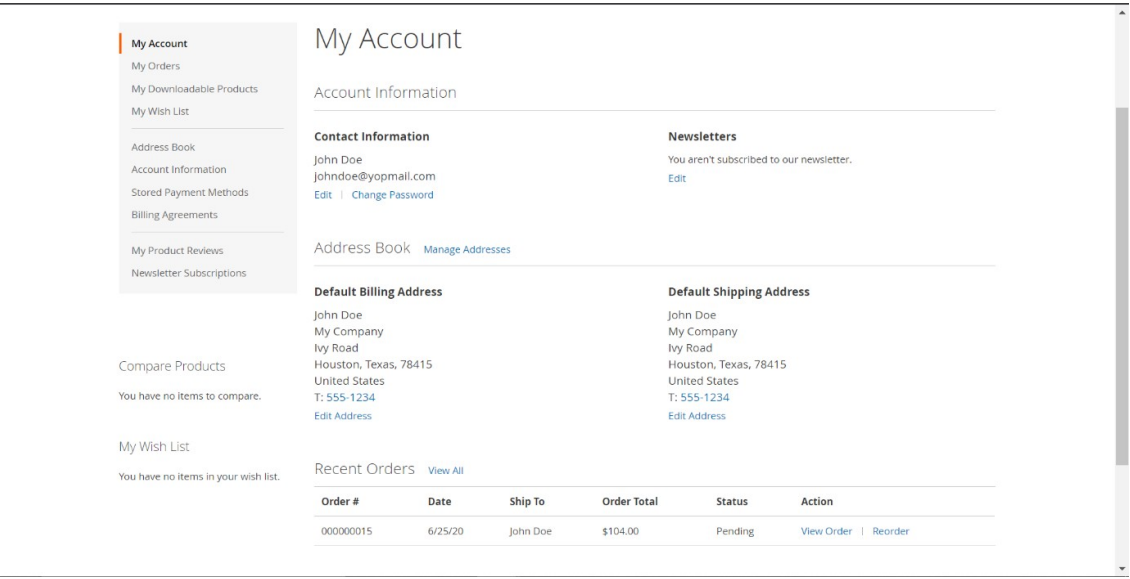
All guest orders created with the customer email will be mapped to the customer when creating customer from frontend OR backend.
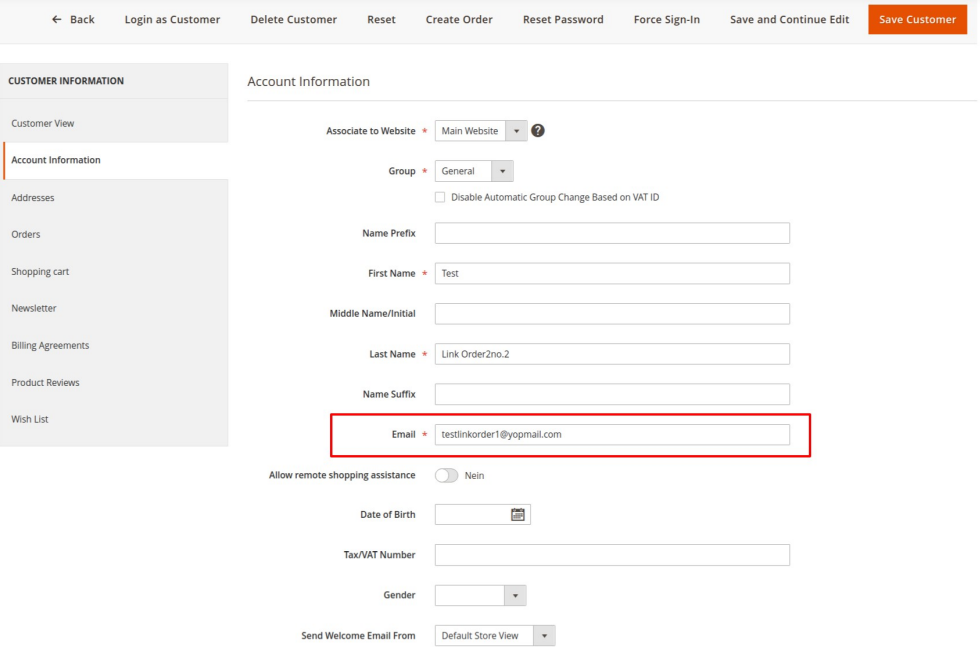
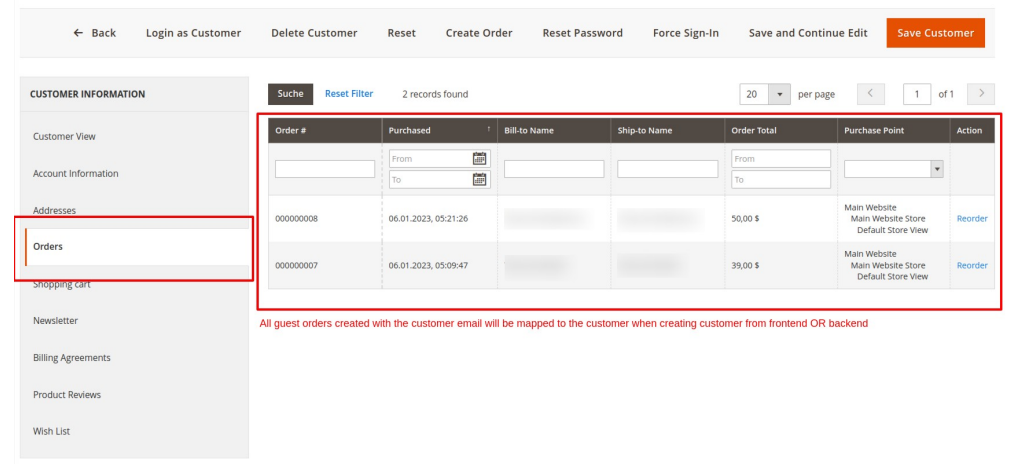
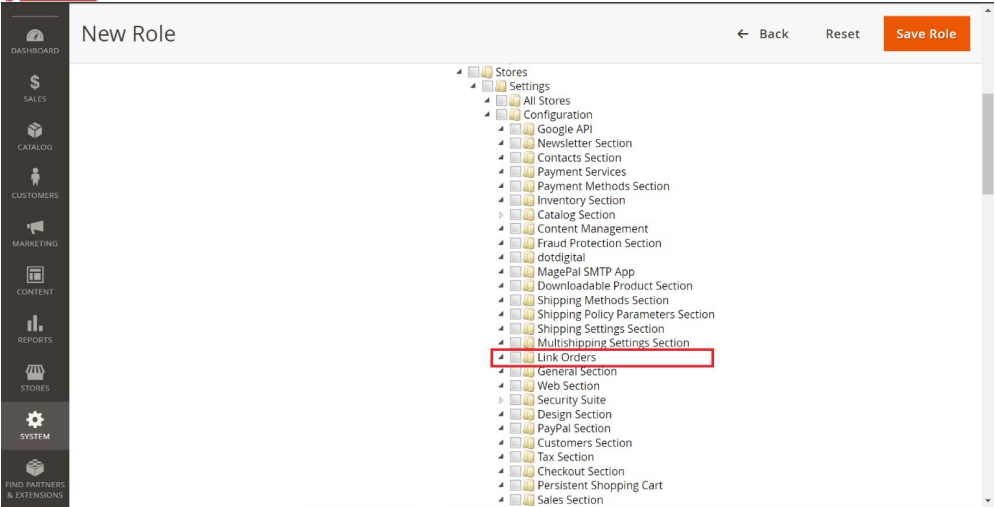
Resource access control for admin users can be done for Link Order configuration.
Go to Admin > System > User Roles
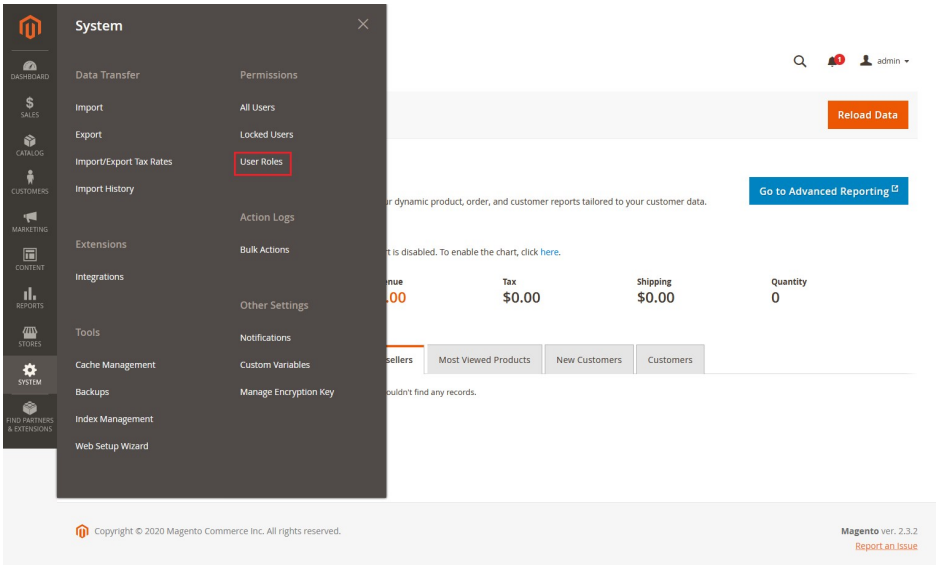
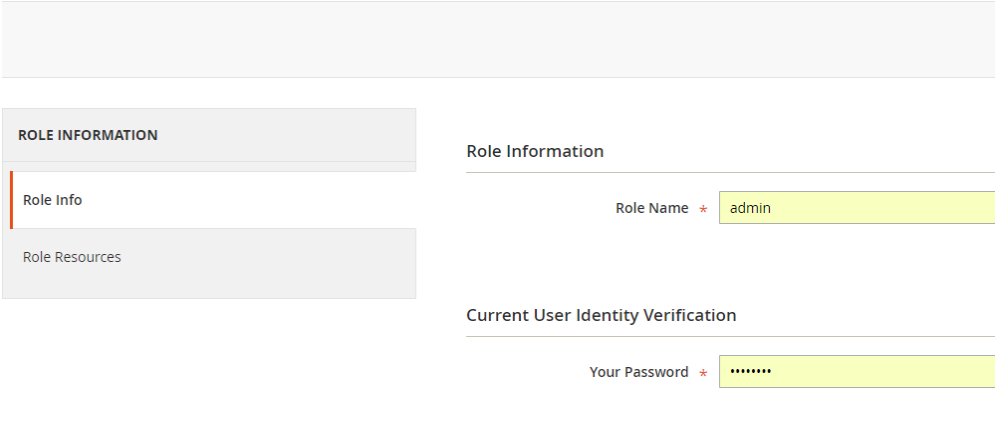
Add a new role resource
Select LinkOrders role at Role Resources section
Set role users for admin accounts, thin click on Save Role to finish.
Technical Requirements / Compatible with:
Magento Open Source (CE) 2.4.5 to 2.4.9
Supported Languages
English, German and easily customizable for other Magento supported language packs
Change Log / Release Notes
Version: 1.1.2: July 2026
- Compatible with Magento 2.4.5 to 2.4.9
- Compatible with Hyva theme 1.4.6
Version: 1.1.1: February 2026
- Added capability to attach previous guest orders to the appropriate registered customer account.
Version: 1.1.0: December 2025
- Compatible with Hyva theme 1.4.x
- Compatible with Magento 2.4.4 to 2.4.8
Version: 1.0.9: September 2025
- Enhancement: Added compatibility with Adobe Commerce (EE & Cloud) for version 2.4.x.
Version: 1.0.8: June 2025
- Compatible with Open Source (CE): 2.4.8
Version: 1.0.7: July 2024
- Compatible with Open Source (CE): 2.4.7-p1
Version: 1.0.6: April 2023
- Compatible with Open Source (CE): 2.4.6
Version: 1.0.5: January 2023
- Link orders to customer account while adding customer from backend
Version: 1.0.4: November 2022
- Compatible with Open Source (CE): 2.4.5
- Link the guest orders placed by registered customers also to customer account.
Version: 1.0.3: June 2022
- Compatible with Open Source (CE): 2.4.4
Version: 1.0.2: January 2022
- Compatible with Open Source (CE): 2.4.3.
- Bug Fix – Params of the link in the Follow-up email received during the guest order creation to create an account are encrypted.
Version: 1.0.1: January 2021
- Compatible with Open Source (CE): 2.4.x.
- Bug Fix - Follow-up email to create account is again sent for registered users when they place order as guest.
Version: 1.0.0: June 2020
- Added admin configuration option to enable or disable the module.
- Added auto assign past guest orders to customer during registration.
- Added email configuration for admin users.
- Added access control for admin users.
Support
If you have questions use our contact form in webshopextension.com