
Categories
Magento
WordPress
SAP Commerce
Odoo
Shopify
Typo3
Shopware
nopCommerce
Pimcore
Hyvä
OXID eShop



































































































PRODUCT SPECIFICATION
Delivery date and time is a Magento 2 extension developed by PIT solutions, which allows the customer to select the desired delivery date, time and add comments from the checkout page while placing an order. This extension is configurable such that the admin can add delivery holidays, time slots for the customer to choose from. The delivery information collected at the time of placing order will be displayed both in the admin and customer’s order detail view page.
Store owners can utilize the Magento 2 Delivery Date and Time Selector Extension to enhance the checkout experience through more control over their customers' delivery options. Customers will have a chance to select a delivery date and time during the checkout process, which will provide them with less possibility of confusion regarding when they can expect to have items delivered and reduce instances of missed deliveries due to misunderstanding what day or time might be an acceptable delivery time. The option for customers to add delivery comments allows them to communicate special notes to the store about their product purchase.
Store owners can use the Admin Panel to set holiday/non-delivery date restrictions and/or set up the time slots that deliveries will be available. This helps ensure that customers see only available delivery options when ordering based on the hours of operation for the Store. Delivery comments/time slots can be disabled/enabled according to business requirements, which provides flexibility in offering delivery options.
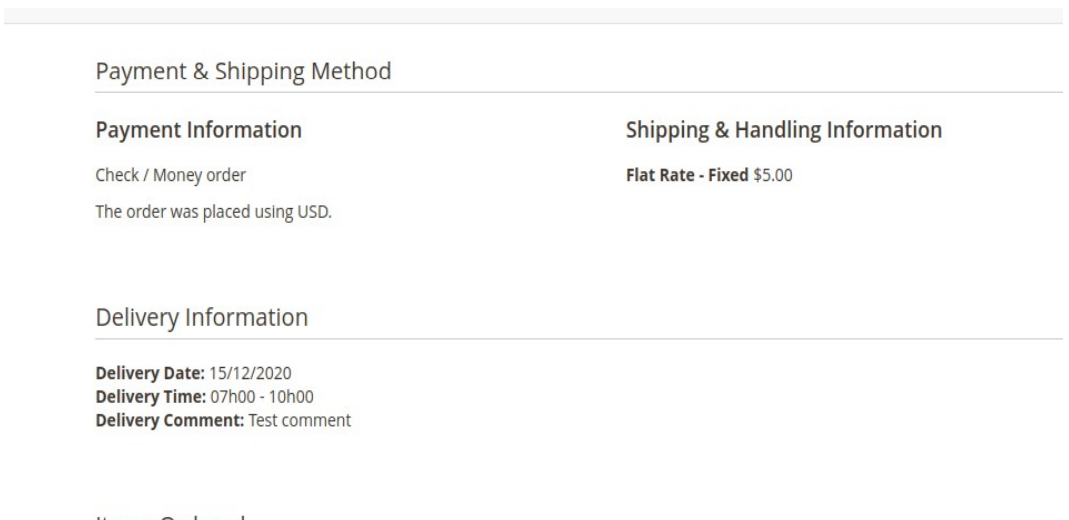
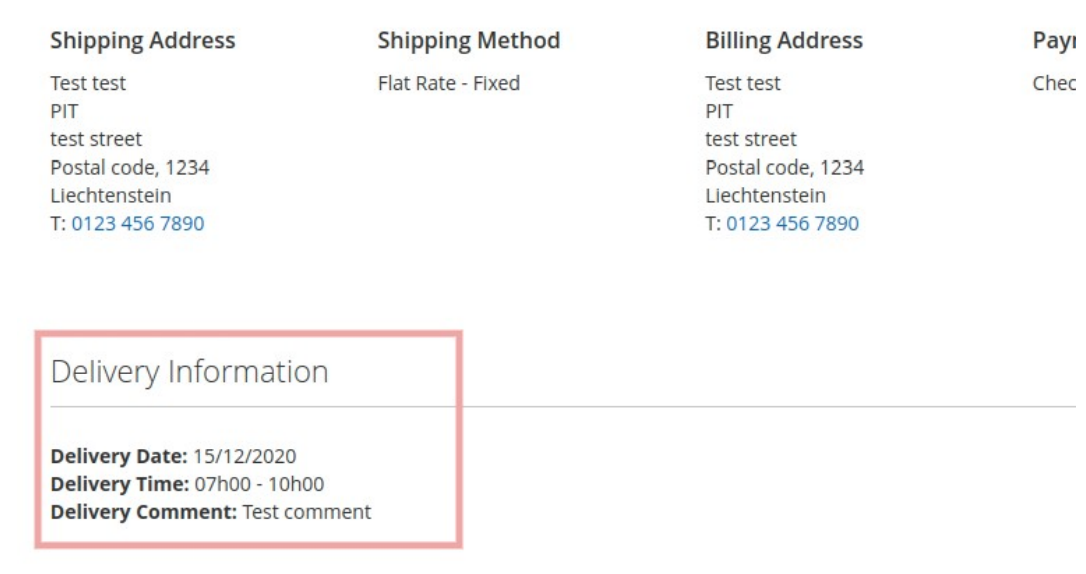
All the details about your delivery date, time, and comments are saved within the order and can be accessed through both the ordering details in the backend of the store and in the customer's account’s order history. This ensures a clear delivery picture and aids with the order fulfilment process. This Magento 2 Delivery Date and Time Selector Extension easily integrate into the checkout process with no need for any additional development work. All configuration takes place in the back office and all changes are immediately applied ensuring a fast and easy to use shopping experience for retailers & customers alike.
FEATURES
- You can easily enable/disable this extension from the admin panel.
- Can enable/disable delivery comment and time slots
- Can add delivery off/holiday dates from the admin.
- Can add delivery time slots from the admin
- No coding is required to add data in admin
- Fast and fine performance
- Hyva theme compatible.
INSTALLATION
To install this module, follow the steps below.
- Download Delivery date and time module.
- Access your web server directories and unzip and upload the content of the zip file to app/code/Pits/DeliveryDatetime/ directory.
- Run below commands on terminal
- php bin/magento setup:upgrade
- php bin/magento setup:di:compile
- php bin/magento setup:static-content:deploy
- php bin/magento cache:clean
ADMIN CONFIGURATION
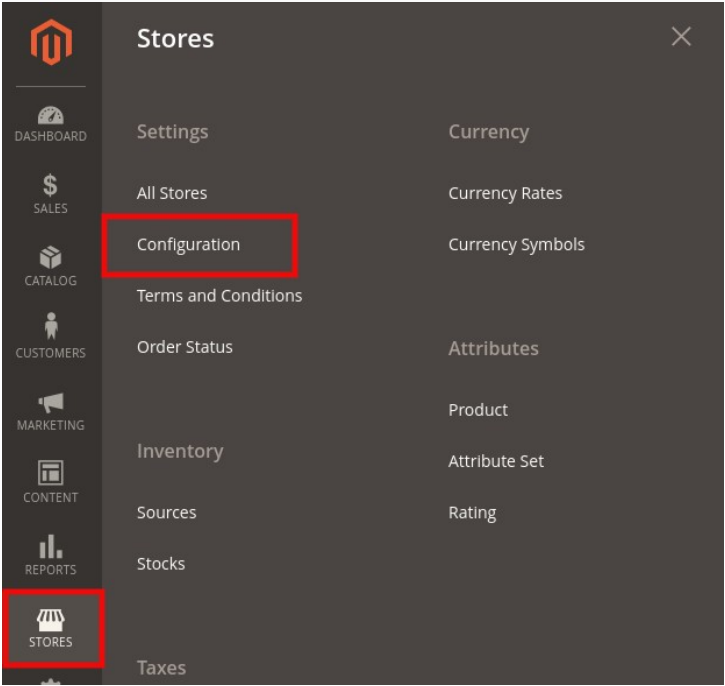
- Login to the Admin panel and choose Stores > Configuration > PITS CONFIGURATION > Delivery Date and time.
Please see the below screenshots.
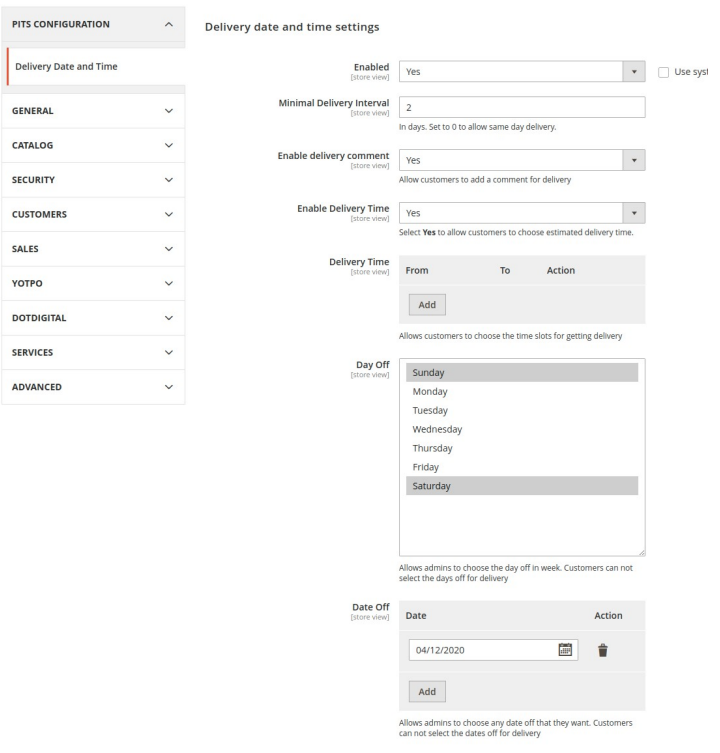
Enabled - To enable the module
Minimal Delivery Interval - Minimum days from current date for the customer to choose from the datepicker
Enable delivery comment – Enable delivery comment box
Enable Delivery Time – Enable delivery time slots for the customer to choose from
Delivery Time – Add delivery time slots, For example
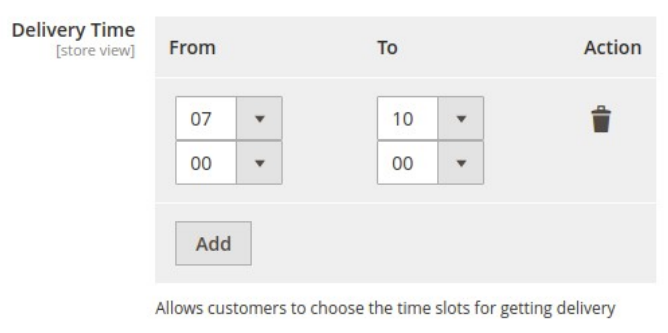
The image above, shows timeslot configured for 07:00AM - 10:00AM. Multiple time slots can be added, which will be displayed as dropdown in the frontend
Day Off – Days off in a week. Customers cannot select the days off for delivery, as those days will be disabled in the datepicker. The field is multiselect.
Date Off - Dates which needs to be marked as off or holiday. Multiple dates can be added. These dates will be disabled in the datepicker.
HOW IT WORKS IN THE FRONTEND
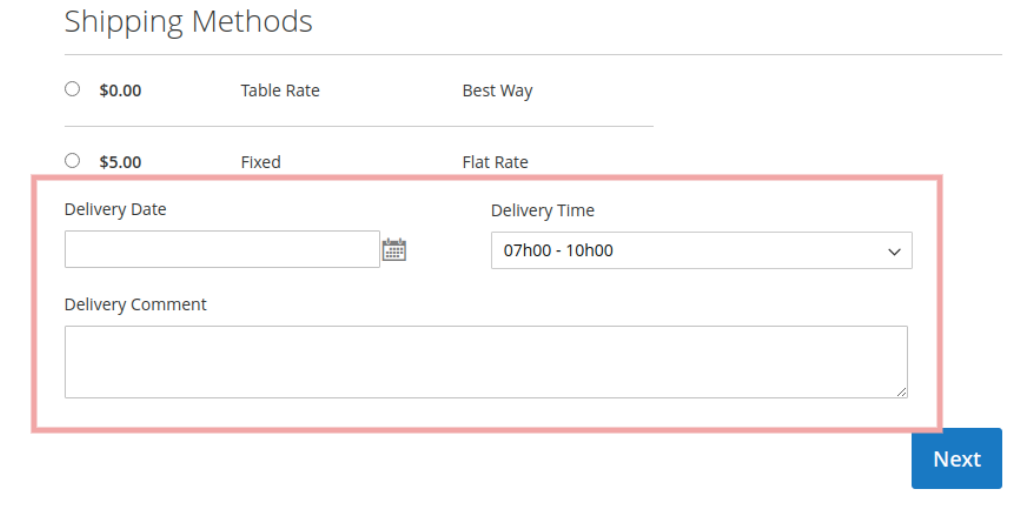
Go to the checkout page and enter the shipping address and check below the shipping method.
CHECKOUT PAGE
ADMIN ORDER VIEW
This extension doesn’t support multi address shipping
CUSTOMER ORDER VIEW
ADDING DELIVERY INFORMATION IN ORDER MAIL
We can add delivery date and other information in mail by adding these variables in emailtemplates from admin side. e.g.: {{var deliveryDate}}
- deliveryDate: For adding delivery date in mail.
- deliveryTime: For adding delivery time in mail.
- deliveryComment: For adding delivery comment in mail.
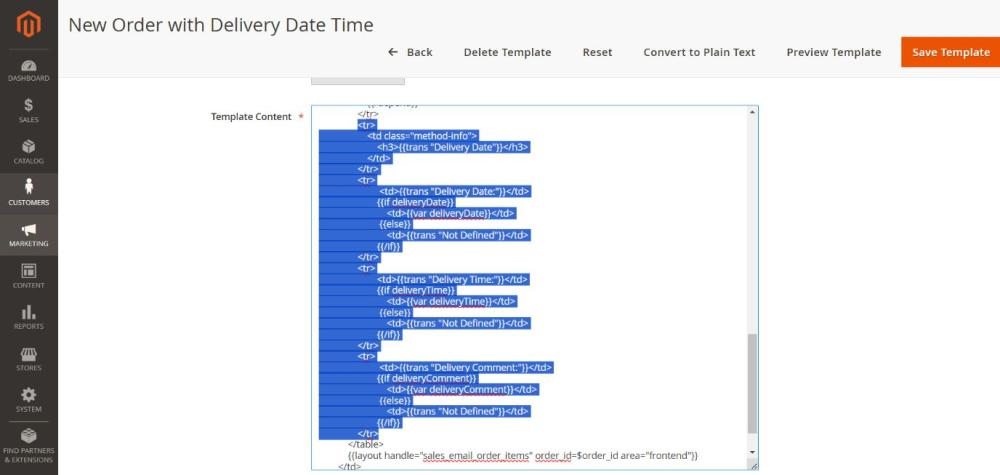
Please follow the steps here to edit the email templates.
TECHNICAL REQUIREMENTS / COMPATIBLE WITH:
- Magento Open Source v2.4.4 to v2.4.8-p3
SUPPORTED LANGUAGES
- English, German, French and easily customizable for other Magento supported language packs
RELEASE NOTES
Version 1.0.7
- Description: Compatible with Magento Open Source 2.4.4 to 2.4.8-p3(CE)
- Compatible with Hyva Theme 1.4.2 version.
Version 1.0.6
- Description: Compatible with Magento Open Source 2.4.4 to 2.4.8-p1(CE)
- Hyva theme compatible.
Version 1.0.5
- Description: Compatible with Magento 2.4.6(CE)
Version 1.0.4
- Description: Compatible with Magento 2.4.5(CE)
- Compatible with Open Source (CE): 2.3.x to 2.4.x
- Stability: Stable Build
- Description: Initial release with all functionalities
SUPPORT
If you have questions, use our contact form in webshopextension.com.