
Categories
Magento
WordPress
SAP Commerce
Odoo
Shopify
Typo3
Shopware
nopCommerce
Pimcore
Hyvä
OXID eShop



































































































Extension Specification
The Magento 2 WebP Image Converter Extension is designed to automatically optimize storefront product images by converting standard formats such as JPEG and PNG into modern WebP format. It integrates seamlessly with Magento’s architecture using plugins, ensuring upgrade safety and stability. The extension detects browser support through the HTTP_ACCEPT header and intelligently serves WebP images to compatible browsers like Chrome, Firefox, Edge, and Opera, while delivering original images to unsupported browsers, ensuring full compatibility across all user environments.
The Magento 2 WebP Image Converter Extension supports both on-the-fly (lazy) conversion and optional CLI bulk processing, allowing flexibility based on server capacity and project requirements. All image conversions are handled locally on the server, eliminating the need for third-party services or additional costs. Converted images are stored separately while preserving the original files, enabling a reliable fallback mechanism. Admin users can configure key settings such as enabling/disabling conversion, adjusting image quality, selecting the processing method, and controlling image quality directly from the Magento backend.
Key features include automatic product image WebP generation, smart browser-based delivery, configurable image quality, transparency support for PNG images, and compatibility with Magento caching systems like Full Page Cache and Varnish. The extension is lightweight and efficient, converting images only when needed to reduce unnecessary server load. Optional CLI commands can be used to pre-generate WebP images in bulk, making it suitable for large catalogs and high-traffic stores.
As a result, the extension significantly reduces image sizes—typically by 25% to 70%— leading to faster page load times, improved Core Web Vitals (especially Largest Contentful Paint), and better overall user experience. These performance improvements contribute directly to higher SEO rankings and lower bandwidth usage. By automating image optimization without requiring manual intervention, the extension provides a cost-effective and scalable solution for enhancing Magento store performance.
Features
- Automatic conversion of JPG and PNG images to WebP format
- Smart browser detection using HTTP_ACCEPT header
- On-the-fly (lazy) image conversion for optimized processing
- Optional bulk conversion via CLI command
- Configurable image quality settings (balance size vs clarity)
- Preserves PNG transparency in WebP images
- Separate storage of WebP images with original image fallback
- Fully compatible with Magento Full Page Cache and Varnish
- Lightweight and efficient processing (only converts required images)
- Admin configuration panel for easy control and customization
Benefits
- Reduces image size by 25%–70%
- Improves page load speed and overall site performance
- Enhances Core Web Vitals (especially LCP)
- Boosts SEO rankings due to faster loading pages
- Provides better user experience across devices
- Saves bandwidth and reduces server load
- Ensures compatibility with all browsers using fallback mechanism
- Eliminates need for manual image optimization
- Scalable solution suitable for large product catalogs
- Improves conversion rates due to faster page interactions
- Easy to install, configure, and maintain
Admin Panel Configuration
Navigate to Admin > Stores > Configuration > Pits Extensions > WebP Converter.
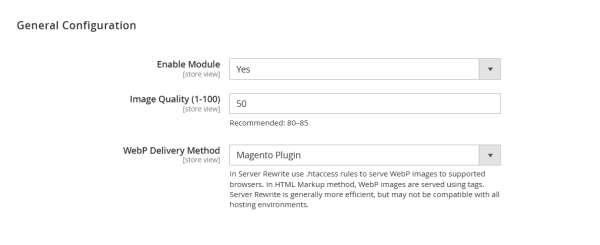
Figure 1 – WebP Converter Settings – General Configuration
Figure 1 displays the admin general configuration of the extension
Enable Module
Enables or disables the WebP Image Converter extension for the selected store view. When set to Yes, the extension will start converting and serving WebP images based on the configured settings. Set to No to completely disable all WebP functionality without uninstalling the module.
Image Quality (1–100)
Defines the compression quality of generated WebP images. Lower values reduce file size but may affect image clarity, while higher values preserve better quality with slightly larger file sizes. A recommended range of 75-85 provides an optimal balance between performance and visual quality.
WebP Delivery Method
Determines how WebP images are delivered to the browser:
- Magento Plugin: Uses Magento’s plugin mechanism to dynamically serve WebP images based on browser support. This method is reliable and compatible across all hosting environments.
- Server Rewrite (if available): Uses .htaccess or server-level rules to serve WebP images directly, offering better performance but requiring proper server configuration.
Choose the method based on your server capabilities and performance requirements.
Server Rewrite Setup for WebP Delivery (.htaccess)
The Server Rewrite Method allows WebP images to be served directly by the web server (Apache) using .htaccess rules. This approach improves performance by bypassing Magento’s PHP processing and delivering WebP images faster to supported browsers. It works by detecting if the browser supports WebP and automatically rewriting image requests to corresponding .webp files when available.
Requirements
- Apache server with mod_rewrite enabled
- mod_headers enabled
- WebP images must already exist in the defined path
- Server must allow .htaccess overrides
Sample .htaccess Configuration
Add the following rules to your media directory .htaccess file:
<IfModule mod_rewrite.c>
RewriteEngine On
# Check if browser supports WebP
RewriteCond %{HTTP_ACCEPT} image/webp
# Check if WebP version of the image exists
RewriteCond %{DOCUMENT_ROOT}/pub/media/catalog/product/webp/$1.webp -f
# Rewrite JPG/JPEG/PNG requests to WebP
RewriteRule ^catalog/product/cache/[^/]+/(.*)\.(jpg|jpeg|png)$
catalog/product/webp/$1.webp [T=image/webp,E=accept:1,L]
</IfModule>
<IfModule mod_headers.c>
# Serve correct content type for WebP
Header append Vary Accept env=REDIRECT_accept
</IfModule>
How It Works
- Detects if the browser supports WebP via the HTTP_ACCEPT header
- Checks if a .webp version of the requested image exists
- Rewrites the request to serve the WebP image instead of the original
- Falls back to the original image if WebP is not supported or not available
CLI Operation: Bulk WebP Image Generation
The extension provides a CLI command to generate WebP images in bulk for all existing product and media images. This is especially useful for large catalogs where you want to avoid on-the-fly conversion and ensure all images are pre-optimized.
Prerequisites
Before running the command, ensure the following:
- The WebP Image Converter module is enabled from:
Stores → Configuration → Pits Extensions → WebP Converter - Required PHP image libraries (GD or ImageMagick) are installed with WebP support
- Proper file permissions are set for the pub/media directory
Command Usage
Run the command from your Magento root directory:
php bin/magento pits:webp:convert
Re-running the Command
The command is designed to be idempotent:
- If you run it again, it will only generate missing WebP images
- Already converted images will be skipped automatically
- This ensures efficient processing without duplication or unnecessary load
Technical Requirements / Compatible with:
- Magento Open Source 2.4.5 to 2.4.9
Supported Languages
- English, German, French
Installation Steps
To install this extension, follow the steps below.
- Download the extension.
- Access your web server directories and unzip and upload the content of the zip file to app/code directory.
- Run the below commands on terminal
• php bin/magento setup:di:compile
• php bin/magento setup:upgrade
• php bin/magento setup:static-content:deploy -f
• php bin/magento cache:flush
Change Log / Release Notes Version:
Version: 1.0.1: August 2026
- Compatible with Magento Open Source (CE) : 2.4.5 - 2.4.9
Version: 1.0.0: March 2026
- Initial version
Support
If you have questions, use our contact form at webshopextension.com or email at [email protected]